- GA4
- Google Analytics
- Tracking
- Troubleshooting
Google Analytics Not Tracking All Visits: 8 Causes
By Olam Sule · Published 21 Sept 2026
TL;DR
GA4 undercounting splits into two halves: visits the tag never sent, and visits GA4 collected but your report hides. Size the gap against a number you already trust, then work through missing tags, single-page routing, denied consent, data filters, thresholding and sampling in that order. We reconcile GA4 against the real numbers for clients most weeks.
Olamide Sule, founder of Dolphin Analytics: a digital analytics expert based in London delivering solutions for agency and in-house clients.
A property that reports fewer sessions than your server logs, fewer orders than your store admin, or fewer conversions than your ad account is a different problem from a property with no data at all. The tag works. It just is not seeing everything. We reconcile GA4 tracking against the numbers clients already trust most weeks, and the order below is the one we work in, because it stops you changing settings that were never the fault.
Is GA4 undercounting, or does the number only look low?
Prove the gap before you fix it. Open Reports > Realtime, load your own site in another tab, and confirm you appear as an active user: Google’s data freshness reference puts Realtime at a few minutes, while data processing can take 24 to 48 hours, so a standard report you refresh an hour after a visit is not evidence of anything. If you never appear in Realtime on any page, the tag is not sending from that page and you have a collection fault, not a counting one.
Yesterday filling in overnight is normal. Yesterday still looking thin a week later is a gap worth measuring.
How do you measure the size of the gap?
Pick one trusted number and compare like with like. Four steps get you a figure you can act on:
- Choose the source of truth. Your ecommerce order table, the CRM record count, the payment processor, or raw server logs. Match the date range and the property time zone, or you will chase an hour of traffic that sits in the next day.
- Compare one metric, not a dashboard. GA4
purchaseevents against confirmed orders, or GA4 sessions against server-side visits. In GA4, open Reports > Engagement > Events for the event count. - Split the gap. In Explore > Free form, put Sessions against Browser, Device category, Country and Landing page. A gap sitting in one browser, one country or one template is a collection fault with an address. A gap spread evenly across everything usually means consent or blocked requests.
- Count the raw events if you can. With BigQuery export switched on, you can count events straight from the raw tables; Google’s BigQuery export documentation notes the export carries raw events rather than processed report data, and that standard properties have a daily export limit of 1 million events.
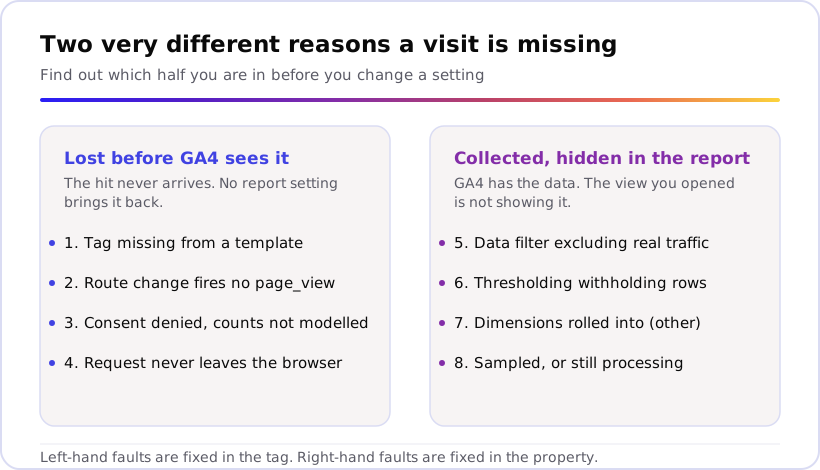
Four faults that lose the hit before GA4 sees it
Collection faults are the expensive half. The visit happened, nothing reached Google, and no filter, date range or report setting brings it back. When we audit a property that undercounts, these four cover nearly every case.
1. The tag is missing from some templates
Sites rarely lose tracking everywhere at once. They lose it on checkout, on a
landing-page builder subdomain, on the one legacy template nobody rebuilt, or
on a page a developer stripped “unused” scripts from. Google’s
tag setup troubleshooting guide
tells you to place the Google tag immediately after the opening <head> tag
and to add it to every page you want to measure, which is exactly the step
that gets missed on templates added later.
Walk your own site with Reports > Realtime open, and check the Views by Page title and screen name card as you go: home, category, product, basket, checkout, thank-you page, blog, any subdomain. Pages that never show up are your gap. Our guide to checking tags with Tag Assistant covers the same check from the browser side. Sonar, our free tracking checker, scans a URL from the outside and reports the tags, pixels and consent setup it can prove from that scan, without you reading any code.
2. A single-page app fires one page view for a whole session
React, Vue and similar frameworks change the screen without loading a new
page, so a visitor who reads six screens can register a single page_view.
GA4’s
enhanced measurement
sends a page view each time the page loads or the browser history state
changes, watching pushState, popState and replaceState events, and Google’s
single-page application guide
recommends that route for apps built on the History API while warning that
leaving it on alongside page views configured in Tag Manager can double count.
Check the setting at **Admin > Data collection and modification > Data streams
your web stream > Enhanced measurement**, open the gear icon, and look at Page changes based on browser history events. Then walk a journey with debug mode on and count the
page_viewevents in DebugView. One event for six screens is an undercount; twelve is the double-count Google warns about.
3. Consent is denied and modelling does not backfill event counts
Consent is the biggest single cause we see on UK and EU properties. Google’s
consent mode documentation
says that with analytics_storage denied the tag will not read or write
first-party analytics cookies, and that an advanced implementation still sends
cookieless pings for future measurement. The gap that leaves is real but
partly recoverable, which is why the implementation detail matters more than
the banner design.
What surprises most teams is how little modelling gives back. Google’s
behavioural modelling documentation
requires at least 1,000 events per day with analytics_storage='denied' for
at least 7 days, plus at least 1,000 daily users sending events with consent
granted on at least 7 of the previous 28 days, and states that modelling is
not applied to event counts such as page_view, first_visit and
session_start. Your user numbers can be modelled while your event totals
stay low. If your banner defaults analytics to denied and consent mode was
never wired up properly, read our walkthrough on
cookie consent blocking GA4 data.
4. The visit never reaches Google at all
Some share of real visits never produces a hit, and the GA4 interface cannot show you what it never received, so this bucket only ever gets sized by reconciliation against logs or orders. Browser privacy defaults also change who looks like a returning visitor: WebKit’s post on full third-party cookie blocking describes Safari blocking cookies for cross-site resources by default and deleting a site’s script-writable storage after seven days of Safari use without interaction on the site.
The fix is architectural rather than a setting. Moving collection to your own domain helps, and Google’s tag gateway documentation describes deploying the Google tag using your own first-party infrastructure, hosted on your website’s domain. Our explainers on Google tag gateway and third-party cookie loss cover what each approach does and does not recover.
Four faults that hide data GA4 already has
The second half is cheaper to fix and easier to miss. GA4 collected the events, and the view you opened is not showing them to you. Rule these out before anyone touches the tag, because a property can look broken for weeks on the strength of one filter.
5. A data filter is excluding real traffic
Internal traffic filters are meant to drop your own team’s visits. They regularly drop customers too, because an office IP range gets entered too broadly, or a developer filter is left switched on after testing. Google’s data filters documentation explains that a filter excludes activity from an IP address or range, that a property supports up to 10 filters, and that each can sit in Testing, Active or Inactive state.
Check Admin > Data collection and modification > Data filters and read every Active filter, including ones created by someone who has since left. The warning in that documentation is the part to take seriously: once a data filter is applied, the effect is permanent, and excluded data is never processed and never becomes available in Analytics or BigQuery. You cannot backfill what an active filter has already dropped, so fix it the day you find it.
6. Thresholding is withholding rows
A report that shows fewer users than you expect may be withholding rows rather than missing them. Google’s data thresholds documentation states that thresholds apply when a report or exploration contains demographic information, audiences based on demographics, or search query data, and that withheld data simply does not appear until the minimum aggregation thresholds are met. Thresholds are system-defined and cannot be adjusted.
Two practical moves: widen the date range, which raises the user count and can bring the rows back, and rebuild the same report without the demographic or interest dimensions. If the totals jump when you drop age, gender or interests, thresholding was the cause and your collection was fine all along.
7. Dimensions are rolled into the (other) row
High-traffic sites with thousands of URLs or campaign values hit table limits. Google’s documentation on the (other) row explains that GA4 surfaces the most common dimension values and condenses less common values under (other) when unique values exceed the table’s row limit, that cardinality drives it, and that the underlying data is still collected. A page you are searching for can be absent from the table while its sessions still sit in the total.
That makes (other) a reporting problem rather than a tracking one. Reduce dimension cardinality where you control it, such as stripping query strings and session IDs out of page paths and standardising campaign naming, and query BigQuery when you need the long tail intact. Our GA4 audit checklist runs these checks in order on a property you have inherited.
8. The report is sampled, or still processing
Sampling makes a number approximate rather than wrong, and people read it as a loss. Google’s data sampling documentation says sampling starts when a request exceeds the property’s quota, which is 10 million events for standard properties, and that a data quality icon shows the percentage of data used. Hover it before you trust any total from a long date range with filters applied.
Processing lag sits in the same bucket. Give yesterday the 24 to 48 hours the data freshness reference allows, then compare like for like. Numbers that settle upward on their own were never missing.
Why did Google Analytics stop tracking after a site change?
A clean step down on one date is a deployment, not decay. Find the first bad day in a daily sessions view, then line it up against four things: your release log, a theme or template update, any change to the cookie banner or its default consent state, and a Tag Manager publish. Something shipped that day, and the drop tells you which visitor group it hit.
Migrations are the usual suspect because they change templates, tag placement and consent all at once. Our posts on GA4 migration tracking breakage and debugging tags that stopped firing in GTM cover the recovery path for each. A drop that fades in over months is a different pattern, usually consent rates, browser defaults or fewer visits.
What counts as a normal gap?
No two systems will ever agree exactly, because they count different things at different moments: a browser hit against a completed order, a session against a server request. Expect a gap. Judge it by shape rather than size.
- Probably expected: stable week to week, spread evenly across browsers and templates, moves in step with your consent rate.
- Probably a fault: appeared on one date, concentrates in one browser, device type or template, widens every month, or grows after a release.
The closest comparison most teams have is their store, and our post on the GA4 and Shopify sales discrepancy walks through that reconciliation properly. If GA4 is showing no data at all rather than a shortfall, the no-data diagnostic is the faster route: this page assumes tracking runs and misses part of the traffic.
How we fix a property that undercounts
When a property undercounts, we start by reconciling GA4 against a number the client already trusts, because that turns “the data feels wrong” into a figure worth spending money on. For one subscription box brand, only 35% of UK and 14.4% of US revenue was tracked before we rebuilt the setup across both stores. Once the numbers could be trusted, the brand unlocked a six-figure ad budget it had been holding back.
Start from the outside if you want a free answer today. Sonar scans a URL the way a visitor’s browser sees it and reports the tags, pixels and consent setup it can prove from that scan, which answers the “is the tag even there” question for any URL you scan, in one click. Tell us what’s broken, or book a call, and we will tell you which of the eight causes above fits what you are seeing.
When the answer needs someone inside the property, that is the paid audit: we work with your GA4 and Tag Manager access through data collection, events and key events, Consent Mode, reconciliation against your source of truth, and reporting and integrations, then hand back a written findings report naming each fault, its impact and the fix.
Frequently asked
Why is Google Analytics not tracking all visits?
GA4 misses visits for one of two reasons: the hit never reached Google, or it arrived and the report is hiding it. Collection faults include the GA4 tag missing from a template such as checkout, a single-page app that changes route without sending a second page view, and denied analytics consent. Reporting faults include an internal traffic filter set too broadly, thresholding on reports that contain demographics, and high-cardinality tables condensing rows into (other). Check the collection side first, because no report setting recovers a hit that was never sent.
Why did Google Analytics suddenly stop tracking?
A clean step down on a single date is almost always something that shipped that day, not GA4 decaying. Line the first bad date up against your release log, a theme or template update, a new or reconfigured cookie banner, a republished Tag Manager container, and any data filter created that week. Traffic that fades over months is a different story and usually points at consent rates, browser privacy defaults or a real drop in visits.
Does consent mode modelling fill the gap in GA4?
Only partly, and not for the numbers most people check. Google's behavioural modelling documentation sets eligibility thresholds a property has to clear on both denied and granted traffic, and states that modelling is not applied to event counts such as page_view, first_visit and session_start. User-level metrics can be modelled while your event totals stay below what actually happened, so a consent-heavy property reads low even when modelling is running.
GA4 Realtime is not working. Does that mean tracking stopped?
Not on its own. Realtime only shows what is arriving right now, so load your own site and watch for yourself as an active user. If you appear, the tag fires on that page and the fault sits in reporting or in templates you have not tested. If you never appear on any page, the tag is missing or blocked, and that is a collection problem.
How do I tell a normal gap from broken tracking?
Judge the shape, not the size. A gap that holds steady week to week, spreads evenly across pages and browsers, and moves with your consent rate is the expected cost of measuring the web. A gap that appeared on one date, concentrates in one browser, one device type or one template, or widens every month is a fault worth fixing. Splitting sessions by browser, device and landing page in an exploration usually separates the two in a few minutes.