- GA4
- Funnel Exploration
- Ecommerce Tracking
- Tracking Audit
Google Analytics Funnel Drop-Off: Real or Tracking Gap?
By Dolphin Analytics team · Published 1 Oct 2026 · Last checked 1 Oct 2026
TL;DR
A Google Analytics funnel drop-off is usually a tracking gap, not lost customers, when one step falls close to zero, the drop sits in one browser, device or hostname, or it starts on the day of a site release. A real drop-off is spread across segments and steady over time. Check the step's event in GA4's Events report and DebugView before redesigning anything. We run these checks for clients most weeks.
Olamide Sule, founder of Dolphin Analytics: a digital analytics expert based in London who audits GA4 and Tag Manager tracking for agency and in-house clients.
A Google Analytics funnel that falls off a cliff between two steps is one of the first things teams show us when they’re pulling their hair out with data challenges. We check funnels like these for agency and in-house clients most weeks, and before anyone redesigns a checkout, we find out whether the drop is real. Often the step’s event never fired, fired under another name, or fired on a second domain that GA4 counts as a separate user without cross-domain measurement. Below is the order we run those checks in during a GA4 audit, written so you can run them yourself.
Is a Google Analytics funnel drop-off real or a tracking gap?
A Google Analytics funnel drop-off is usually a tracking gap when one step falls close to zero, the drop sits in one browser, device or hostname, or it starts on the day of a site release. Real drop-off looks different: it is spread across segments and holds steady from week to week. Rule out the tracking signs first, because they are quick to check and a redesign is not.
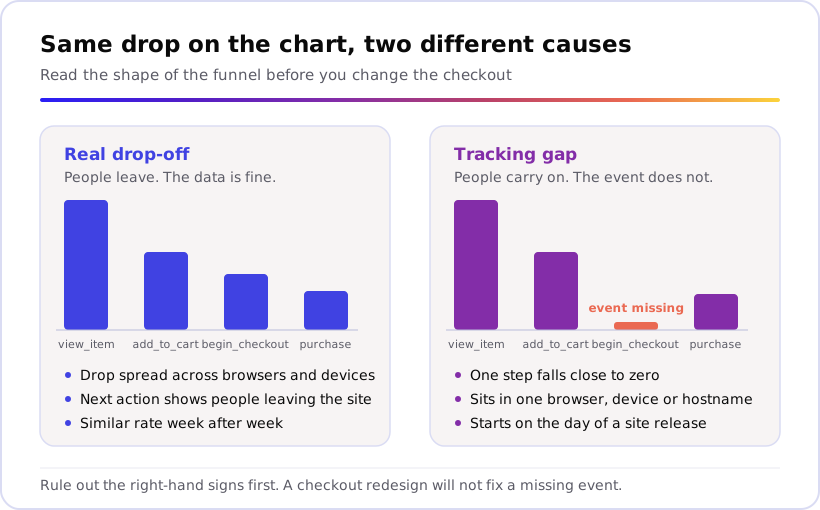
Here is how we read the shape when a client sends us a funnel:
| What you see in the funnel | What it usually means | Check first |
|---|---|---|
| One step falls close to zero | The step’s event is missing or renamed | The Events report |
| A later step shows more users than the step before it (open funnel) | People reach the later step without the earlier event firing | Switch the funnel to closed and compare |
| The drop sits in one browser or device | A tag or script failing there | Breakdown by Browser, then Device category |
| The drop sits on one hostname | A checkout on another domain without cross-domain measurement | Breakdown by Hostname |
| The drop starts on a specific date | A site release or tag change that day | Trended funnel |
| The drop is spread evenly and steady over time | Real behaviour | Next action and segments |
How does a GA4 funnel exploration count drop-off?
A GA4 funnel exploration counts users, and only in the steps they complete in the order you set. Google’s funnel exploration guide says users are only counted in the steps they complete in the specified sequence. In a closed funnel, a step whose event never fires stops every user at that point, including people who went on to buy.
The same guide says you can define up to 10 steps, each with conditions based on events your users trigger or dimension values they share. Four of its settings change the number you see, so check them before you blame the site:
- Open or closed. In an open funnel, users can enter at any step. In a closed funnel, they must enter at the first step. A closed funnel shows a missing event as drop-off; an open funnel exposes it, because users who skipped the silent step still appear at the next one.
- Directly or indirectly followed by. Google says steps that directly follow the previous step must occur immediately after it, while steps that indirectly follow can have other actions in between. Set a checkout step to directly follow the one before, and any other action in between can take the user out of the funnel.
- A time limit. The Within option sets a time frame in which a step must follow the previous one. A tight limit counts slow buyers as drop-off.
- First sequence only. If a user completes the funnel more than once in the date range, only the first sequence is reported.
The date range matters too. Google’s data retention guide says the retention setting only affects explorations and funnel reports, and lets a standard property keep user-level data for 2 months or 14 months. A year-on-year funnel on a property set to the shorter window has nothing to compare against.
Our first move on client work is to rebuild the funnel with event-based steps, indirectly followed, with no time limit, then read it both open and closed. Our guide to GA4 reports shows where funnel exploration sits among the other reports.
Which tracking gaps fake a funnel drop-off?
When we trace a false drop-off for a client, it usually comes back to one of six gaps: a missing or renamed step event, a checkout on another domain, checkout events sent by a separate pixel, consent mode, single-page checkout steps that send no page view, or a report that is sampled, thresholded or still processing. Each one shows fewer users at a step than really reached it.
1. The step’s event is missing or renamed
Google’s event naming rules
say event names are case sensitive: my_event and My_Event are distinct
events. So a funnel step built on Google’s
recommended
begin_checkout event does not count a tag that sends Begin_Checkout or beginCheckout, and the
funnel shows those users as gone.
Check it in Reports > Engagement > Events. Google’s Events report guide says the report shows how many times each event is triggered and how many users trigger each. Compare the total users for each step’s event with the step before it. A near-miss name further down the list, or no row at all, is your answer. Our GA4 recommended events guide lists the exact names for shopping and lead funnels.
2. The checkout runs on another domain
If the basket sits on one domain and the checkout or booking engine on another, GA4 can split one buyer into two users. Google’s cross-domain guide says that without cross-domain measurement, a single user visiting different root domains is identified separately: two users and two sessions instead of one. In a closed funnel, the user who added to basket never reaches checkout, and the user who checks out never added to basket.
Spot it with a Breakdown by Hostname, which GA4 defines as the subdomain and domain names of the URL visited. The funnel guide notes that users are only attributed to the first breakdown value that applies to them. In an open funnel, a checkout hostname row with users at the checkout steps and almost none at the product steps is the tell.
The fix sits in Admin > Data collection and modification > Data streams > Web, then your stream, then Configure tag settings > Configure your domains, as Google’s set-up steps show. Our cross-domain tracking guide walks through it.
3. Checkout events come from a different tag
Hosted checkouts often run their own tracking. On Shopify,
custom pixels
are loaded in a Lax sandbox and track pages such as checkout and post-purchase.
Shopify’s standard customer events
include checkout_started and checkout_completed. Storefront steps then often
sit in Google Tag Manager and checkout steps in a pixel, built by different
people.
When we audit stores set up this way, a gap between add_to_cart and
begin_checkout usually means the pixel never maps checkout_started to
begin_checkout, or sends it to a different GA4 property. Our
Shopify checkout tracking fix covers
the pixel setup step by step.
4. Consent mode takes users out of the sequence
Visitors who decline analytics cookies can’t be followed from step to step.
Google’s consent mode guide
says that with analytics_storage denied, an advanced setup sends cookieless
pings and does not read or write first-party analytics cookies, while a basic
setup blocks Google tags until consent is granted.
Google’s
behavioural modelling guide
adds that when users don’t grant consent, events are not associated with a
persistent user identifier, so Analytics can’t detect if the events are the
action of the same user. It also says modelling in funnel explorations is
applied differently than in reports. A decliner’s add_to_cart and purchase
can’t be joined into one journey, and a banner that behaves differently on the
checkout pages can turn that into a drop at one step.
The fix isn’t in the funnel. It’s in the banner setup and the share of visitors who accept, which our consent and GA4 guide covers.
5. Single-page checkout steps send no page view
If your funnel steps are page views matched on a page path, and the checkout
changes step without a full page load, those page views may never arrive.
Google’s enhanced measurement guide
says page views are collected each time the page loads or the browser history
state is changed by the active site. An advanced setting on that option controls
whether the event is sent based on browser-history events, listening for
pushState, popState and replaceState.
Check it under Admin > Data collection and modification > Data streams,
then your stream, then the settings icon under Enhanced measurement and the
page views option’s advanced settings, following Google’s
enhanced measurement steps.
Better still, build checkout steps on events such as
begin_checkout and add_payment_info, not on URLs.
6. The report is sampled, thresholded or still processing
Sometimes the tracking is fine and the view is not. Google’s sampling guide says sampling starts when the events behind an exploration exceed the quota, 10 million events for a standard property, and the data quality icon shows the share of data used. The thresholds guide says data can be withheld when an exploration includes demographic data, so a breakdown by a demographic dimension such as age can hide rows. And the data freshness guide says data in reports may change after the daily data becomes available, so end your date range yesterday, not today.
How do you check one funnel step in GA4?
Check one step at a time: confirm the event exists, find where the drop sits,
find when it started, then walk the journey yourself in Tag Manager Preview and
GA4 DebugView. The steps below take one pair of steps, such as add_to_cart to
begin_checkout, from suspicion to an answer.
- Confirm the event exists. Go to Reports > Engagement > Events and compare total users for the two steps’ events, as in gap 1 above.
- Build the funnel, then find where the drop sits. In Explore, open
your funnel, or click the Funnel exploration template under Start a new
exploration. Google’s
funnel exploration guide
sets out the build: click the edit pencil on Steps, give each step a
name, add a condition such as the
begin_checkoutevent, click Add step for each new one, then click Apply. Set Breakdown to Browser, then Device category, then Hostname. A drop confined to one row is a tag problem, not a customer problem. - Find when it started. Switch the visualisation from the standard funnel to the trended (line chart) funnel, then click the step’s name at the top of the chart. The same guide describes both views and the clickable step names. A line that falls away on one day points at a release, not at your customers.
- Compare open and closed. Switch the funnel to open. If the later step now shows more users than the step before it, people are reaching it without the earlier event, unless your site has a genuine shortcut such as a buy-now button that skips the basket.
- Walk the journey in Tag Manager. In your container’s Workspace tab, click Preview, enter your site URL and click Connect, as Google’s preview guide sets out. Add something to the basket, start checkout, and watch which tags fire at each step. Our GTM debugging guide covers tags that don’t.
- Watch the events land. In GA4, go to Admin > Data display > DebugView. Google’s DebugView guide lists Tag Assistant preview mode as one way to switch debug mode on. Each step’s event should arrive once, under the exact name your funnel uses. If DebugView stays empty, our DebugView troubleshooting guide covers why.
If a step fails here, the drop-off is a tracking gap, and the fix belongs in the tag, not in the checkout design.
What if the funnel drop-off is real?
If every step’s event fires in testing, the drop is spread across browsers, devices and hostnames, and it holds steady over time, treat the drop-off as real. The funnel exploration then helps you find out why: what people do next, how long they take, and which groups leave.
Google’s funnel exploration guide describes three tools for that. Next action shows the most common user actions following each funnel step. Show elapsed time shows the average time elapsed between steps. And you can apply up to 4 segments to compare groups, such as new against returning users, or paid against organic traffic.
Then take the question off the dashboard. Session recordings, a usability test or a few minutes on the checkout with your own phone will tell you more about why people leave than another report will.
When should you call someone?
Most teams can run the checks above in an afternoon. Call someone when one of these is true:
- Every step fires in Preview and DebugView, and the funnel still shows a drop you can’t explain.
- The drop sits on a checkout domain, booking engine or payment page you don’t control.
- Checkout events come from a platform pixel or an app, and nobody on the team owns it.
- Your consent setup changed recently and you can’t tell how much of the drop it explains.
- Someone is about to fund a checkout redesign on the strength of this funnel.
That last one is where we’re most useful. Our paid GA4 audit is scoped and quoted per property, works inside the account with access to GA4 and Google Tag Manager, and goes through five layers, from data collection to reporting. It ends in a written findings report naming each fault, its impact and the fix.
Clean step events matter because a real drop-off is worth finding. On one client’s app sign-up funnel, this is what the reading turned up.
Insights from a global car maker's app sign-up funnel increased its app sign-ups by 67% and recovered around 1,000 sign-ups a month that a bug had been losing.
If you’d like a second pair of eyes on which side of the line your funnel sits, tell us what’s broken, or book a call. To see which tags, pixels and consent setup your site loads from the outside, run our free Sonar scan: one click, no account.
Frequently asked
How do I create a funnel in Google Analytics 4?
In GA4, go to Explore and choose the Funnel exploration template. Give each step a name and a condition, usually an event such as add_to_cart or begin_checkout, and click Add step for each new one. Google allows up to 10 steps. Decide whether the funnel is open or closed, then add a breakdown such as Browser or Hostname to check the tracking before you read anything into the drop-off.
What is the difference between an open and a closed funnel in GA4?
In an open funnel, users can enter at any step. In a closed funnel, they must enter at the first step. A closed funnel shows a missing step event as drop-off, because users who skipped the silent step can't reach the next one. An open funnel exposes the same gap, because those users appear at the later step with no earlier one, so compare both views when a drop looks wrong.
Why does my GA4 funnel show more users at a later step than an earlier one?
In an open funnel, users can enter at any step, so a later step can outnumber the one before it. When that happens between two steps every buyer should pass through, such as begin_checkout before purchase, the earlier step's event is usually missing for some users. Check it in Tag Manager Preview and DebugView, unless your site has a genuine shortcut such as a buy-now button that skips the basket.
Why do my GA4 funnel numbers differ from the Events report?
The Events report shows how many times each event fired and how many users fired it. A funnel exploration counts users only in the steps they complete in the order you set, and reports only the first sequence if a user completes the funnel more than once. Strict settings such as directly followed by, or a Within time limit, lower the funnel further.
Does consent mode affect GA4 funnel explorations?
Yes. When a visitor declines analytics cookies, Google says their events are not associated with a persistent user identifier, so GA4 can't tell whether they came from the same person. A user-based funnel can't join those events into one journey, and Google applies modelling differently in funnel explorations than in standard reports. A consent banner that behaves differently on checkout pages can then show up as a drop at one step.
Who can check whether my funnel drop-off is a tracking problem?
We do this work for agency and in-house teams most weeks. If you want to talk it through first, send us a message or book a call, free. If you already know you need someone inside the account, our paid GA4 audit works through the property with access to GA4 and Google Tag Manager and ends in a written findings report naming each fault, its impact and the fix.