- GA4
- Google Ads
- Attribution
- Cross-network
What GA4's Cross-network channel really means
By Dolphin Analytics team · Published 26 Aug 2026 · Updated 8 Sept 2026
TL;DR
Cross-network is a default GA4 channel that groups traffic from Google ad campaigns running across several networks at once, mainly Performance Max and Demand Gen. Because those campaigns serve on Search, Display, YouTube, Gmail and Discover together, GA4 can't credit one network, so it files them all under Cross-network. That's useful shorthand, but it hides which placement actually drove the conversion. Untangling that attribution is work we do for clients most weeks.
Olamide Sule, founder of Dolphin Analytics: a digital analytics expert based in London delivering solutions for agency and in-house clients.
You open GA4, filter to your best week, and a channel called Cross-network sits near the top with no obvious explanation. It isn’t a bug, and it isn’t organic. It’s Google’s label for a specific kind of paid traffic, and the label is doing more hiding than most reports let on. Untangling channels like this is attribution work we do for clients most weeks. Here’s what it means, which campaigns create it, and how to see what it’s covering up.
We set up and audit GA4 and Google Ads tracking for agencies and in-house teams every week, so this is the explanation we’d give a client staring at that channel for the first time.
What is Cross-network in GA4?
Cross-network is a default GA4 channel that groups paid traffic from Google ad campaigns running across several networks at once. It exists because some Google Ads campaign types don’t stay on one placement: they serve on Search, Display, YouTube, Gmail and Discover together, so GA4 can’t credit a single network and files the whole lot under one label instead. Per Google’s default channel group definitions, a session lands in Cross-network when the source is a Google ad source and the campaign’s network type is cross-network.
That’s the mechanism. The consequence is the part worth understanding: one channel name now stands in for traffic that came from very different places.
Which campaigns feed the Cross-network channel?
Two Google Ads campaign types feed Cross-network: Performance Max and Demand Gen (formerly Discovery). Both are designed to run across Google’s networks in a single campaign, so Google tags them as cross-network rather than assigning them to Paid Search or Display. A normal Search campaign still shows as Paid Search; a Performance Max campaign covering the same keywords, plus YouTube and Gmail, shows as Cross-network.
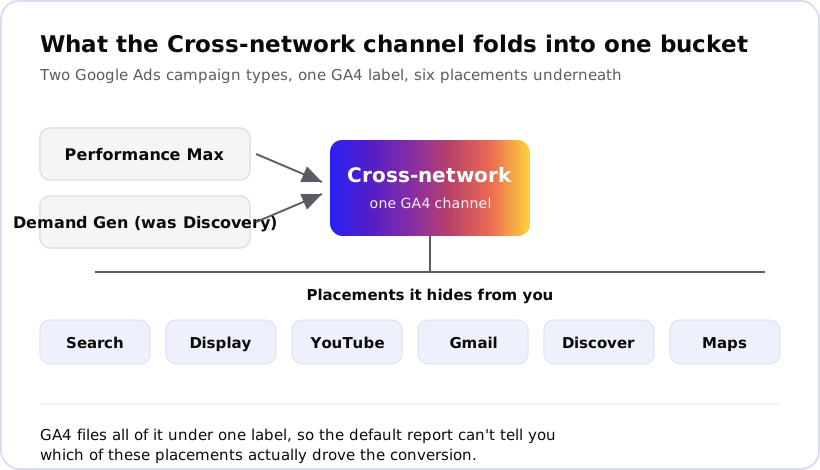
Here’s the quick reference for what goes where:
| GA4 channel | Google Ads campaign type | Where it serves |
|---|---|---|
| Paid Search | Standard Search | Google Search results |
| Display | Standard Display | Display Network sites and apps |
| Paid Video | Standard Video | YouTube |
| Cross-network | Performance Max | Search, Display, YouTube, Gmail, Discover, Maps |
| Cross-network | Demand Gen | YouTube, Discover, Gmail |
The pattern is simple: if a campaign is locked to one network, GA4 names that network. If it spans several, GA4 gives up naming them and calls it Cross-network.
Why does GA4 use a Cross-network channel at all?
GA4 uses Cross-network because the campaign genuinely ran across networks, so no single-network label would be honest. Performance Max hands placement decisions to Google’s automation: the same campaign might show a YouTube video to one person and a Search ad to another, chosen in real time. Google can’t tell GA4 “this was Search” when the next impression was Gmail, so it reports the campaign type rather than the placement.
From Google’s side, that’s accurate. Cross-network is a true statement about how the campaign works. The problem is that “accurate about the campaign type” and “useful for attribution” aren’t the same thing, and Cross-network is the first while quietly failing the second.
What does the Cross-network channel hide?
Cross-network hides which placement actually drove the result. Because Performance Max bundles Search, Display, YouTube, Gmail, Discover and Maps into one campaign, a conversion credited to Cross-network could have come from a high-intent search or from a cheap Display impression someone barely noticed. The channel tells you the money came through Google Ads. It doesn’t tell you whether that money bought demand or just followed it.
That matters for two decisions. First, budget: if you can’t see that most Cross-network conversions trace back to branded search the user would have found anyway, you might scale a campaign that’s claiming credit rather than creating sales. Second, trust: when Cross-network shows a big number and your other channels dip, it’s tempting to assume Performance Max is working, when some of that volume was pulled out of channels that were already converting.
This is the same shape of problem we see across attribution work, not just in Google Ads. Here is what one audit of Meta reporting found. For a subscription retailer, 71% of the conversions Meta claimed came from people who saw an ad and never clicked. Many of those sales would likely have happened regardless. A reported channel taking credit for demand it didn’t create is the exact trap Cross-network sets, dressed in Google’s labelling instead of Meta’s.
How do you see what’s inside Cross-network in GA4?
You can’t fully break Cross-network down inside GA4, but three steps get you most of the way. GA4 will confirm which campaigns feed the channel; Google Ads holds what’s left, and even that is limited for Performance Max.
- Confirm the campaigns. In GA4, open Reports, then Acquisition, then Traffic acquisition. Set the primary dimension to Session default channel group, find Cross-network, and add Session campaign as a secondary dimension. That shows the Performance Max and Demand Gen campaign names behind the channel.
- Check it against spend. Compare those Cross-network sessions and conversions against the same campaigns in Google Ads. If GA4 shows far more or far fewer conversions than Google Ads for the same campaign, the gap is a tracking issue (auto-tagging, consent, or duplicate events), not the channel itself.
- Go to Google Ads for placement detail. Performance Max reports less network-level breakdown than a standard campaign, but the campaign’s Insights and the asset-group reporting show more than GA4 does about where impressions and conversions landed.
Treat the Cross-network figure as a starting point. It tells you a campaign type is active and converting; it does not, on its own, tell you which placement earned the sale.
When is Cross-network a real tracking problem?
Cross-network is normal most of the time. It becomes a real problem when the numbers stop reconciling: GA4 Cross-network conversions that don’t match Google Ads, a channel that swelled right as your Google Ads conversions stopped adding up, or Cross-network sessions appearing with no matching spend at all. Those are signs of an auto-tagging break, a consent setup dropping paid sessions, or duplicate conversion events, not a quirk of the channel.
The channel itself is Google being honest about how Performance Max works. The risk is treating “Cross-network converted” as the end of the analysis when it’s really the start. If the number drives budget decisions, you need to know whether it reflects demand your campaigns created or demand they simply intercepted. That’s a tracking and attribution question, and it’s the kind of blind spot a proper audit is built to surface. We do this attribution work for clients most weeks. Here is what that turned up on one engagement: For a private aviation company, 88.6% of contacts with deals had no web attribution at all: 443 of 500 were offline or CRM-entered. Attribution work then traced a $767,500 charter enquiry back to a single organic search visit.
If your Cross-network numbers look too good, or you can’t tell whether Performance Max is creating sales or claiming them, that’s exactly what the free data audit checks: we trace the reported channel back to what actually happened in the business, before it shapes your next budget.
Frequently asked
What is Cross-network in GA4?
Cross-network is one of GA4's default channels. It groups traffic from Google ad campaigns that run across several networks at once, rather than sitting on a single network like Search or Display. In practice that means Performance Max and Demand Gen (formerly Discovery) campaigns. GA4 assigns a session to Cross-network when the source is a Google ad source and the campaign's network type is cross-network, per Google's default channel group definitions.
What campaigns show up as Cross-network in GA4?
Performance Max and Demand Gen campaigns are the two that land in Cross-network. Both serve across Google's networks together, so Google tags them as cross-network rather than assigning them to one placement. A standard Search or Display campaign stays in Paid Search or Display; a Performance Max campaign, which can serve on all of them, goes to Cross-network instead.
Is Cross-network traffic paid or organic?
Cross-network traffic is paid. It comes from Google Ads campaigns, so the underlying source and medium is usually google / cpc. If you see Cross-network sessions with no matching Google Ads spend, that points to a tagging or auto-tagging problem worth checking, not a new free channel.
How do I see which network drove a Cross-network conversion?
GA4 won't split a Performance Max conversion by network on its own. Add Session campaign as a secondary dimension to confirm which campaigns feed the channel, then go to Google Ads for placement detail. Even there, Performance Max reports less network-level breakdown than a standard campaign, so treat the Cross-network number as a starting point, not a full answer.
Why did Cross-network suddenly appear in my reports?
Cross-network usually appears the first time you run a Performance Max or Demand Gen campaign, or when Google migrated older Smart Shopping and Discovery campaigns into those types. It's a normal channel, not a tracking fault. It's worth a check only if the volume looks wrong against your Google Ads spend, which can signal an auto-tagging or consent issue underneath.